
Work In Process Inventory
User Instructions
The Work in Process (WIP) system is an AS/400 based system used to accumulate and value work in process inventory at process level. Process level is defined as the point in which goods have just completed a machine process. For the end user the system provides product, machine type, department, and mill level access to quantities and value for current, as well as prior work in process inventories. For the company, it provides a standard way to generate and value work in process inventory, which will be used in conjunction with a comprehensive variance analysis system.
The WIP system is based on the foundation of the Mfg. Cost System and the PLUS system. Using the MfgId structure in the Mfg. Cost System, the WIP system will generate a WIP id for each unique combination of components, routings, and waste. The system uses the same four tiered structure as the Mfg. Cost System. The system uses the same costing logic as the Mfg. Cost System to value each WIP id based on the routings, components, and waste factors in that WIP id. Once the WIP ids are reviewed and verified, goods will be tallied and entered into the WIP system. As goods are being entered, the extended value can be viewed on screen or in report format. Once the entire inventory is entered and reconciled, the system will post the inventory value directly to General Ledger. The WIP system will reference whatever standard sets of the Mfg. Cost and PLUS systems are to be used for inventory valuation.
The WIP system can be accessed by two methods. If the user has access to the Cost/PLUS Administrator Menu the user can enter the WIP system from option 34. Most users will enter the system off the main security menu by entering the option number for WIP System. The WIP mill number and reports output queue is dictated by the mill number and output queue entered upon entry to the WIP System. The WIP system is made of three menus, one for interactive screens and programs and two for reports and batch programs. From each menu the user can access their reports output queue, system messages, and submitted batch jobs. To gain access to the WIP system the user must fill out the proper system access forms requesting the WIP System. Once the WIP System appears on your menu contact the Corporate Cost Administrator for access to menu options in the WIP system.
WIP Id Structure and Generation
Within the WIP system there are three types of WIP ids; generated (G), component (C), and manual (M). Generated ids are generated by the system and represent goods that have been through at least one machine process. Component ids are also system generated but represent goods in process that have not been run through a machine. A component id carries the same value as the item in raw materials inventory. Manual ids are created by the user to represent items that may not be included in the other two types. The majority of the ids used in taking the inventory will be generated.
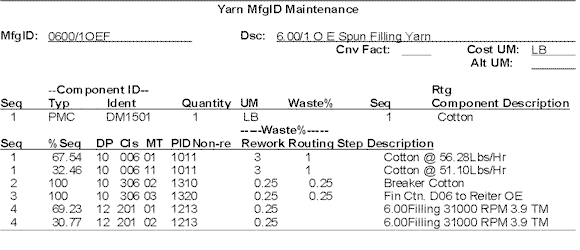
The following is an example of WIP id generated from a yarn MfgId in the Mfg. Cost System for an open end spun filling yarn:
WIP ids generated:
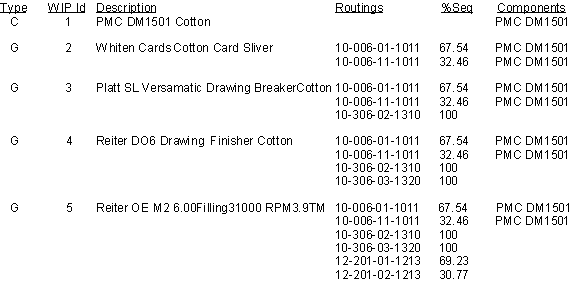
As seen above, a WIP id is generated at each change of a routing sequence. The system will not create a WIP id if that combination of routings and components has already had a WIP id created for it.
If the decision was made to count the output of the Whiten Cards for each machine type the user would create a manual WIP id. A manual WIP id is created by copying an existing WIP and changing the routings, components, or waste makeup.
The following is how a user would copy the WIP id for card sliver twice and make two manual WIP ids so the goods coming out of each machine could be counted and costed separately :

For Manual WIP ids only, the component ids, routings, waste factors, sequence numbers, sequence percentages, and component quantities are all fully changeable, removable, or new elements can be added. At the time of creation, manual WIP ids will not show an accurate cost, they show the cost of the WIP ids they were created from. The cost will be correct once a cost calculation is run. Manual WIP ids should be created when:
- The component totals do not equal one full unit. (Ex. At warping the cost is built knowing size is to be added at slashing, so the component total at slashing would only be .88 for a twelve percent size pick up. However at the warping process you don't want the cost being built using only eighty-eight percent of the material value.)
- The total of the percent of sequence for a completed routing step does not equal one hundred percent. (Ex. The above example would also have the routing step at warping understated, at only eighty-eight percent labor, so you would need to correct the percentage to account for all of the labor at that process.)
- The cost structure does not represent the flow of the goods on the floor. (Ex. If you are running a 50-50 blend at carding without intimate blending, the cost is based on the two materials going into the card machine at the same time. However in reality the products are being run through two cards separately and will be blended at drawing. So to capture two card sliver cans that contain one hundred percent of each raw material type the user must create two manual ids if they already do not exist.)
- The user wants to create two WIP ids for the same item. (Ex. It is decided to count cotton bales at quarter bale sizes. To aid in counting the user can create a three quarter, one half, and one quarter bale WIP id.).
Each WIP id has the following data elements associated with it :
- Description - There are two fields for description. By default, the first description for generated ids is the machine type description off the last machine type in the routing structure. The second description is the description from the Mfg. Cost System of the last routing the WIP id contains. For component ids the first description field is made up of the component id from the associated raw materials system and the second description field is the description from the raw materials system. Manual WIP ids have the same description as the WIP id it was created from. If the user does not like default description, both description fields can be changed from the WIP maintenance screen. As long as the routing, component, and waste makeup do not change the description will remain, so the setting up of a WIP description is a one time task.
- Status - The two status for a WIP id are (A)ctive and (I)nactive. The user can change the status in WIP maintenance. This was added so that the user can eliminate WIP ids from reports and screens that may not be in process. If specified, inactive ids can show up on reports and screens. Inactive ids are costed in the same fashion as active ids, so if a WIP id is made inactive in error, once it is flagged as active the current cost will be accurate. Only active WIP ids will print on the tally sheet. During generation, if new WIP ids are added they are automatically created with a status of active.
- Cost Unit of Measure - This unit of measure comes from the MfgID in the Mfg. Cost System the WIP id was created from. This element can not be changed in the WIP system.
- Count Unit of Measure - This element can be whatever the user decides to set up in the WIP maintenance. It is used to ease in the counting of goods, so the people counting can count the goods in a unit that they are familiar with. Count units of measure must be set up for all active ids. Once a count unit of measure is set up it will remain with the life of the WIP id unless changed by the user. The count unit of measure is the unit of measure that prints on the tally sheet. Sample count units of measure include : bale, cone, package, bundle, and yards. By default on a new WIP id, the count unit of measure will be the alternate unit of measure from MfgID in the Mfg. Cost System the WIP id was created from.
- Conversion Factor - The conversion factor is the conversion from the count unit of measure to cost unit of measure. A count unit of measure can not be set up without setting up a conversion factor also. Once a conversion factor is set up it will remain with the life of the WIP id unless changed by the user. By default on a new WIP id, the conversion factor will be same as the conversion factor in the MfgId from the Mfg. Cost system the WIP id was created from.
- Counter - This value is the number of times that the WIP id appears in MfgIds in the Mfg. Cost System. It can not be maintained.
- Reference MfgId - This item is the MfgId in the Mfg. Cost System from which the WIP was first created from. For manual WIP ids, it is the generated or component WIP id the manual WIP id was created from. It can not be maintained.
- Old Age - This item is a flag that specifies whether the WIP id is determined to be old age. The valid values for this item are 'Y' (Yes), 'N' (No), 'O' (Override). There will be a detailed section on old age further in the manual.
- Last Change - The user name, date, and time of the last person to maintenance the WIP id. It can not be maintained.
- Department - The department of the last routing step in the WIP Id. It can not be maintained.
- Job Class - The job class of the last routing step in the WIP Id. It can not be maintained.
- Machine Type - The machine type or operation class of the last routing step in the WIP Id. It can not be maintained.
- Six Cost Buckets - There are six cost buckets for each WIP id. They will be detailed in the section on costing.
WIP ids must be generated for each of the four cost tiers that the mill uses. Each tier has its own generation job. Each generation will create any new ids that are not already in WIP and delete any WIP ids that are not used in the Mfg. Cost System. The generation will print a listing of new WIP ids and a listing of WIP ids deleted during the generation. Only generated and component ids can be deleted during a generation. If the user runs the generation job with trial run equal to 'Y', the job will print the two listings but will not add or delete any WIP ids. This feature is used so a generation could be run to access the impact of changing a routing step or component in the Mfg. Cost System.
The costing portion of the WIP system follows the same logic as the Mfg. Cost System. The material value is determined by the total value of the goods from raw materials, compounded by the standard waste factors at each routing step. The labor portion comes from the PLUS system. The overhead and U.C.C. value comes from the General Ledger Account Allocation in the Mfg. Cost System. WIP costing does not rely on the costs in the Mfg. Cost System. Everytime a WIP cost calculation is run it will generate an error listing for costing errors. Errors could be caused by an invalid routing step, or a missing raw material. When a cost calculation is run all WIP ids, including inactive ids, are costed. A cost calculation can be run at any time. If transactions have been entered but not locked by the period end close job, the extended value of the inventory will reflect any cost changes. The cost calculation will not affect inventories locked by the period end close jobs.
The WIP cost structure uses the same six buckets of cost used in the Mfg. Cost System. Currently those buckets are as follows :
1. Direct Materials
2. Indirect Materials
3. Labor
4. Variable Overhead
5. Fixed Overhead
6. U.C.C.
The inventory value for the mill will be posted to General Ledger in the six bucket format.
The WIP system contains a feature of determining whether WIP ids are considered old age. To close a period the user must run the Old Age Calculation (option 18 off of WIP Batch Menu Two) at least once a period and should be run each time WIP ids are generated. This program will check to see if any of the WIP ids reference any MfgIds that have been manifested into finished goods inventory in the prior 90 days. If any of the MfgIds have been manifested into finished goods inventory, the system will flag the WIP id with a 'N' for old age. If no production has been manifested for any of the referenced MfgIds, the program will flag the WIP id with a 'Y' for old age. WIP ids that are flagged with a 'Y' for old age can be counted and valued, but none of the value will be passed to the General Ledger. If a WIP id is flagged with a 'Y' but is not considered true old age the user may override the old age flag. This event can occur for new styles that are in process but have never been manifested into finished goods inventory. To override a WIP id's old age flag the user should go to WIP maintenance and place a value of 'O' in the old age category. Any value associated with an overridden WIP id will be passed to the General Ledger. The user should carefully review to check for old age WIP ids prior to closing a period. Any WIP ids flagged as 'O', will be changed to either a 'Y' or an 'N' each time the Old Age Calculation is run.
The WIP system uses the same four tiers as the Mfg. Cost System. If the user wants to change the name of the screens and reports for a given tier, they must change the tier name in the Mfg. Cost System. If the user desires to customize the menu option names or remove options off the menus, they can contact the Cost System Administrator for menu maintenance. The first menu in the WIP system is the WIP Interactive Menu. To access the other two menus the user should press the pageup or pagedown keys on their keyboard. Command key usage is detailed in the bottom right of each menu.
Throughout the WIP system many of the reports and screens can be sorted for easier viewing and use by the user. Sorting can be done by the following criteria:
1. By department and job class.
2. By department and machine/operation type.
3. By WIP ID.
For each sorting option you can specify an optional range to show on the report or screen. The range parameters are as follows:
1. A single or range of WIP Ids.
2. Active or inactive status.
3. By WIP type.
4. Department.
5. Department and job class.
6. Department and machine/operation type.
7. By old age flag.
To ease in the physical counting of goods, a tally sheet has been designed with the WIP id, description, component description, and count unit of measure. Each WIP id has three columns for entering quantities. The first column is for goods that are finished on machine (Ex. card sliver in a can under a card machine). All quantities in this column are assumed to be half full and will be halved automatically by the system upon entry. The second column is for goods that are finished off machine or stock in process (Ex. yarn cones in a cart). All quantities in this column are assumed to be full. Any goods that are precisely counted and should not be halved should be entered in this column. The last column is for goods that are finished on the next process (Ex. a can of card sliver under a drawing frame). All quantities in this column are assumed to be half empty and will be halved automatically by the system upon entry. To ease in the entry of goods the tally sheets and the transaction entry screens are matching in design.
The following section contains tips for a first time setup and use of the WIP system.
- Have the Cost System Administrator setup the menu descriptions and remove unneeded menu options using menu maintenance.
- Run the WIP id generation with trial run equal to 'N' to generate the WIP ids for the levels that you need (Options 19-22 - Batch Menu One).
- Run the Old Age Calculation to flag WIP ids to be written off (Options 18 - Batch Menu Two).
- Run a cost calculation for the levels that you generated WIP ids for (Options 24- 27 - Batch Menu One).
- Once the WIP Id generation is finished, run a WIP id structure listing in WIP id order (Options 1-4 - Batch Menu One).
- Reviewing the structure listing, mark which WIP ids should be flagged inactive.
- Enter what units of measure you wish to have as valid count units of measure into WIP Count UOM Maintenance (Option 35 - Interactive Menu).
- Enter the WIP maintenance screen and select to sort the screen in WIP id order, press ENTER without entering a specific WIP id. A screen of WIP ids will appear, select all ids and start flagging which ids are inactive (Options 6-9 - Interactive Menu).
- Run another WIP structure listing in WIP id order with only active ids selected and explode detail equal to 'Y' (Options 1-4 - Batch Menu One).
- Reviewing the new structure listing, mark which WIP ids should be redone as WIP manual ids.
- Determine what items do not have WIP ids and define the component, routing, and waste structures for them.
- Start creating the manual WIP ids. While creating the WIP ids, perform the maintenance to properly set up the routing, component, and waste structure (Options 11-14 - Interactive Menu).
- Run another WIP structure listing in WIP order (Options 1-4 - Batch Menu One).
- Go to WIP maintenance and select to view all active WIP ids in WIP id order. Using the new structure listing, start entering the count unit of measure and conversion factor for all WIP ids. While doing this perform any description maintenance needed (Options 6-9 - Interactive Menu).
- Once finished entering count units of measure and conversion factors, run a WIP listing. Using the WIP listing verify that all ids have correct count units of measure and conversion factors (Options 11-14 - Batch Menu One).
- Run a cost listing and verify that the costs are in line (Options 6-9 - Batch Menu One).
- Print the tally sheets and instruct the counters on the three columns on the tally sheet (Options 1-4 - Batch Menu Two).
- Take a physical count using the tally sheets to record inventory quantities.
- Using the tally sheet, key in the WIP id and then the quantity into the WIP Transaction Entry Screens from the same column as the item was entered into the tally sheet. Press ENTER periodically to update the file (Options 19-22 - Interactive Menu).
- Run a transaction listing to see a detailed listing of quantities to reconcile with. A cost listing can be run for a detailed cost breakdown (Options 6-9 - Batch Menu Two, Options 11-14 - Batch Menu Two).
- Run a transaction listing with the parameters of Old Age = 'Y' to review inventory flagged for an old age writeoff (Options 6-9 - Batch Menu Two).
- If any WIP ids are to be overridden for old age, change the flag in WIP id maintenance (Options 6-9 - Interactive Menu).
- Rerun transaction listing and a mill summary for final review prior to closing the period (Options 6-9 - Batch Menu Two, Option 16 - Batch Menu Two).
- Run the period end close to lock and post the inventory (Option 19 - Batch Menu Two).
For the following examples it will be assumed that the four tiers are : Yarn, Warp/Slash, Weaving, and Finishing.
- Yarn WIP Inquiry - Interactive inquiry to all elements associated with a single yarn WIP id. Upon entry if ENTER is pressed a selection screen of WIP ids to choose from will appear in the order and optional range selection upon entry to the screen. This screen will display the routing, component, and waste makeup of the WIP id, and will also show the individual transactions entered for a given id.
- Warp/Slash WIP Inquiry - Same as option one except for Warp/Slash level.
- Weaving WIP Inquiry - Same as option one except for Weaving level.
- Finishing WIP Inquiry - Same as option one except for Finishing level.
- Unused.
- Yarn WIP Maintenance - An interactive program to allow maintenance to the count unit of measure, conversion factor, status, old age flag, and description of a system generated yarn WIP id. For manual yarn ids you can also change the component, routing, and waste makeup. Upon entry if ENTER is pressed a selection screen of WIP ids to choose from will appear in the order and optional range selection upon entry to the screen.
- Warp/Slash WIP Maintenance - Same as option six except for Warp/Slash level.
- Weaving WIP Maintenance - Same as option six except for Weaving level.
- Finishing WIP Maintenance - Same as option six except for Finishing level.
- Unused.
- Yarn Manual WIP Creation - This interactive screen will allow you to copy a yarn WIP id to create a manual yarn WIP id. Once the WIP id is created the manual WIP id can be maintained by pressing command key five. The screen goes directly to the maintenance screen for the last WIP id created when command key five is pressed.
- Warp/Slash Manual WIP Creation - Same as option eleven except for Warp/Slash level.
- Weaving Manual WIP Creation - Same as option eleven except for Weaving level.
- Finishing Manual WIP Creation - Same as option eleven except for Finishing level.
- Unused.
- Unused.
- Unused.
- Unused.
- Yarn WIP Transaction Entry - This interactive screen allows multiple entry fields for rapid entry of yarn WIP id quantities. Only by pressing ENTER will the transaction files get updated. Each time a user leaves this screen the system will print an audit log of units entered during the session.
- Warp/Slash WIP Transaction Entry - Same as option nineteen except for Warp/Slash level.
- Weaving WIP Transaction Entry - Same as option nineteen except for Weaving level.
- Finishing WIP Transaction Entry - Same as option nineteen except for Finishing level.
- WIP Transaction Entry By Lot # - A screen whereby in process units can be input by lot number, department, and machine type. The program will determine the WIP id to match the units to by the MfgId matched to the lot, and location of the goods in the plant by department and machine type. This program is only used by plants using the AFG Lot Control System.
- Unused.
- Unused.
- Unused.
- Unused.
- Unused.
- Unused.
- Unused.
- Unused.
- Unused.
- Unused.
- Unused
- WIP Count UOM Maintenance - This interactive screen is used to enter what will be valid count units of measure. A count unit of measure cannot be used unless it is entered at this screen. Also in this screen is the description for the count unit of measure.
- Unused.
- Yarn WIP Structure Listing - This report details the component, routing and waste makeup for all or a range of yarn WIP ids. The report can be sorted in department-job class, department-machine type, or WIP id order. If explode is equal to 'Y' is specified the report will show the entire WIP structure. If explode equals 'N', the report will only show what components or routings exist at that process. The report also shows what WIP ids are used in the product.
- Warp/Slash WIP Structure Listing - Same as option one except for Warp/Slash level.
- Weaving WIP Structure Listing - Same as option one except for Weaving level.
- Finishing WIP Structure Listing - Same as option one except for Finishing level.
- Unused.
- Yarn WIP Cost Listing - This report details the six bucket cost breakdown for all or a range of yarn WIP ids. The report can be sorted in department-job class, department-machine type, or WIP id order.
- Warp/Slash WIP Cost Listing - Same as option six except for Warp/Slash level.
- Weaving WIP Cost Listing - Same as option six except for Weaving level.
- Finishing WIP Cost Listing - Same as option six except for Finishing level.
- Unused.
- Yarn WIP Listing - This report details the description, department, job class, machine type, type, status, cost unit of measure, count unit of measure, conversion factor, referenced Mfg. Cost System MfgId, and old age flag, for all or a range of yarn WIP ids. This report is used a great deal to verify that a WIP id has a count unit of measure and an accurate conversion factor. The report can be sorted in department-job class, department-machine type, or WIP id order.
- Warp/Slash WIP Listing - Same as option eleven except for Warp/Slash level.
- Weaving WIP Listing - Same as option eleven except for Weaving level.
- Finishing WIP Listing - Same as option eleven except for Finishing level.
- Yarn WIP Dependency Listing - This report is a tree structure listing of what yarn WIP ids are used in other yarn WIP ids. The first process starts at the left of the report with the last WIP id for that product being in the far right. As long as the space below a WIP id is empty it is assumed to use that WIP id.
- Warp/Slash WIP Dependency Listing - Same as option fifteen except for Warp/Slash level.
- Weaving WIP Dependency Listing - Same as option fifteen except for Weaving level.
- Finishing WIP Dependency Listing - Same as option fifteen except for Finishing level.
- Yarn WIP Id Generation - This batch program will generate all the component and generated yarn WIP ids. It will also delete any unused component or generated yarn WIP ids. Two listings will come from this job; one a listing of yarn WIP ids that were created, and two a listing of yarn WIP ids that were deleted. If the job is run with Trial Run equal to 'Y', the listings will generate but no creation or deletion will take place.
- Warp/Slash WIP Id Generation - Same as option nineteen except for Warp/Slash level.
- Weaving WIP Id Generation - Same as option nineteen except for Weaving level.
- Finishing WIP Id Generation - Same as option nineteen except for Finishing level.
- Activate WIP's From In-Process - This program will inactivate all WIP ids and activate only those WIP ids that are tied to MfgIds that are matched to lots in process. This program is only used by plants using the AFG Lot Control System.
- Yarn WIP Cost Calculation - This option will cost all yarn WIP ids. It must be run to correctly value the yarn WIP ids. The user must input the fiscal year to get the proper overhead and U.C.C. values. An optional type to cost has been added to speed up the calculation if only one type of WIP id has changed.
- Warp/Slash WIP Cost Calculation - Same as option twenty-four except for Warp/Slash level.
- Weaving WIP Cost Calculation - Same as option twenty-four except for Weaving level.
- Finishing WIP Cost Calculation - Same as option twenty-four except for Finishing level.
- Unused.
- Yarn MfgID Cross-Ref List - This report shows all the yarn MfgIds associated a given yarn WIP id. The status of Cost System MfgId is also shown. This report is used a great deal to verify the origin of WIP id. The report can be sorted in department-job class, department-machine type, or WIP id order.
- Same as option twenty-nine except for Warp/Slash level.
- Same as option twenty-nine except for Weaving level.
- Same as option twenty-nine except for Finishing level.
- Unused.
- Trial Component Breakdown - The program will break down the WIP inventory into raw material component units for use in compiling a test sheet for inventory reconciliation. The program will also break down the units manifested into finished goods inventory for the fiscal period specified. Formula units can be broken down into supply units by stating Breakdown Formulas equal to 'Y'. If the Breakdown Formulas is left to 'N' the system will stop the breakdown with mixed formula units. There are two error listings that generate from this option. One shows WIP ids in which the components do not equal one complete unit. These errors may indicate an improper component structure for a WIP id. The second error listing shows goods manifested to finished goods inventory in which the MfgId was not found in the Mfg. Cost system. The amount of units on this listing will not be included in the component breakdown. This listing is useful for finding styles that were manifested but not properly costed.
- Trial Component Breakdown Rpt. - This option will run a report for fiscal year and period that the Trial Component Breakdown (Option 34 - WIP Batch Menu One) was last run for. The report shows the amount of raw material units in WIP inventory and raw material units that were contained in goods manifested into finished goods inventory. This report has three levels of details; machine type summary, department summary, and mill summary.
- Unused.
- Yarn WIP Tally Sheet Print - This option will print the tally sheets for all, a certain type, or range of active yarn WIP ids. If Print Barcode equals 'Y', then a barcode will print on the tally sheet to speed up the entry of the transactions by using a wedge reader. To print the barcoded sheet a Decision Data Model 6706 printer with a Magnumâ card installed is required.
- Warp/Slash WIP Tally Sheet Print - Same as option one except for Warp/Slash level.
- Weaving WIP Tally Sheet Print - Same as option one except for Weaving level.
- Finishing WIP Tally Sheet Print - Same as option one except for Finishing level.
- Unused.
- Yarn WIP Transaction Listing - This report will show the total for each count unit of measure, and cost unit of measure for each yarn WIP id. If cost is requested it will show the total cost of each yarn WIP id and it's extended value. The report gives subtotals at each of the selected sorting criteria and can show subsets of the inventory if requested.
- Warp/Slash WIP Transaction Listing - Same as option six except for Warp/Slash level.
- Weaving WIP Transaction Listing - Same as option six except for Weaving level.
- Finishing WIP Transaction Listing - Same as option six except for Finishing level.
- Unused.
- Yarn WIP Valuation Listing - This report shows the six bucket breakdown of cost for each yarn WIP id entered. The report gives subtotals at each of the selected sorting criteria and can show subsets of the inventory if requested.
- Warp/Slash WIP Valuation Listing - Same as option eleven except for Warp/Slash level.
- Weaving WIP Valuation Listing - Same as option eleven except for Weaving level.
- Finishing WIP Valuation Listing - Same as option eleven except for Finishing level.
- Unused.
- WIP Valuation Listing - Mill Summary - This option generates two reports that show the total dollars, broken down into the six bucket format, for each department in the mill, and gives a mill summary total in the same format. One report is by department and machine type and the other report is by department. The department and machine type version shows a comparison of prior period units and dollars and will print a '**' where a line has a ten percent jump in cost per unit. The mill summary totals are the values that will post to General Ledger. The report will show valid WIP ids, overridden WIP ids, old age WIP ids, and their value in separate sections. Values associated with old age WIP ids can be omitted from the reports by placing a 'N' for Show Old Age.
- Unused.
- WIP Old Age Calculation - This option will flag all WIP ids with either a 'N', or 'Y' for old age. This option should be run each time WIP ids are generated and at least once a period.
- WIP Period End Close - This job will lock all quantities and costs for the accounting period entered. This job can only be run once a period. Once it is run no adjustments to the inventory can be made within the WIP system. Any transactions entered after the job is run will apply to the next period. This job will also post to General Ledger the six cost buckets at the bottom of the Mill Summary Report. This option will generate a component breakdown report based on the final inventory, a General Ledger interface report, and a mill summary report of the final inventory.
- Unused.
- Period End Component Breakdown - This report is the same as the Trial Component Breakdown Rpt (Option 35 - WIP Batch menu One) except it is for prior period inventories. The user may select the fiscal year and period to print.
- Unused.
- Unused.
- Yarn WIP Trx History Listing - This report is the same as the Yarn WIP Transaction Listing except it is for prior period inventories. The user may select the fiscal year and period to print.
- Warp/Slash WIP Trx History Listing - Same as option twenty-four except for Warp/Slash level.
- Weaving WIP Trx History Listing - Same as option twenty-four except for Weaving level.
- Finishing WIP Trx History Listing - Same as option twenty-four except for Finishing level.
- Unused.
- Yarn WIP Val. History Listing - This report is the same as the Yarn WIP Valuation Listing except it is for prior period inventories. The user may select the fiscal year and period to print.
- Warp/Slash WIP Val. History Listing - Same as option twenty-nine except for Warp/Slash level.
- Weaving WIP Val. History Listing - Same as option twenty-nine except for Weaving level.
- Finishing WIP Val History Listing - Same as option twenty-nine except for Finishing level.
- Unused.
- WIP Valuation History -- Mill Summary - This report is the same as the WIP Valuation Listing -- Mill Summary except it is for prior period inventories. The user may select the fiscal year and period to print.
- Unused.
- Unused.
The WIP period end close should only be run once the WIP inventory has been counted, valued, reviewed, and reconciled. This option will book the value for the WIP inventory (excluding value associated with old age WIP ids) to the General Ledger. The inventory will post to six General Ledger accounts. The accounts match the six cost buckets that the inventory is valued in.
During the period end close program several listings will generate at the user's location and at the corporate accounting office. The first listing generated is a mill summary report of the final WIP inventory. The next set of listings are from the period end component breakdown that runs during the period close. The last listing to generate is a listing by General Ledger account of the amount posted to each account.
The period close will move all current transactions and value from the current transaction files into history files. Once the period end close is run, any reports for a closed period must be run out of the history files.
Q. What should be checked if no extended value is showing up for WIP ids that have units matched to it ?
A. First check to see if the WIP id has a valid conversion factor to the count unit of measure. Next check the cost per cost unit of measure, if that is wrong check the structure of the WIP id and re-run the cost calculation.
Q. How can I determine if an old age WIP id is really a valid WIP id ?
A. Check to see if the product is a new in the plant, if so override the WIP id with an 'O' for old age.
Q. If WIP ids have matching descriptions how can I determine which WIP id to match units to?
A. First check the component and routing structure for any differences, then check the MfgId Cross-Ref List to see what products are associated to the WIP ids and choose the WIP ids associated with active products.
Q. Only half of my units showed up on the transaction listing, what happened ?
A. When entering units into the transaction entry screen, only the units entered in the 'Finished Off Machine' column will be recorded as whole units. The amounts entered in the 'Finished On Machine' and the 'Finished On Next Process' columns are assumed to be still on a machine and the machine is assumed to be half full. Since the machines are assumed to be half full, the system will automatically half the units entered.
Q. How can I fix a generated WIP id that has a wrong component or routing structure?
A. You can't. The system will not allow routing or component maintenance on a generated WIP id. There are two ways to get around this problem, one is to create a manual WIP id and fix the manual WIP id created. The other method is to see what MfgId(s) are associated with the WIP id and make corrections to the MfgId(s) and re-run the WIP Id Generation. Most structure problems represent a problem in the structure of the MfgId(s), which is a signal of an incorrect cost for finished goods inventory valuation. In most cases the user should fix the MfgId and re-run the WIP Id Generation.
Q. I forgot to override some WIP ids for old age before the period end close was run, how can I get this value in General Ledger ?
A. Determine the value to be added in the six bucket cost format and contact the corporate accounting office for a manual journal entry to the General Ledger.
Q. What can I do if the overhead and U.C.C. costs for a WIP id are wrong ?
A. First re-run the cost calculation and pay close attention to the fiscal year entered. If it is still wrong check the Mfg. Cost System MfgIds associated with the WIP id for a cost error or improper structure.
Q. How can I remove or correct transactions entered before the period close job is run ?
A. Enter the adjusting amount(s) to WIP id(s) in transaction entry with a negative transaction. This can be done by entering the amount and pressing the field minus on your keyboard.
Not included in this web site. You can find copies in the original hard copy of the manual.
To keep from repeating information the following screens and reports are from only one tier of the WIP system.
Please contact Danny Erskine with any comments, questions, or suggestions about this web page.