
Manufacturing Cost System
User Manual
The Manufacturing Cost System is an AS/400 based system that was originally designed to calculate the standard cost for product pricing and inventory values. The system gives the company a method to combine material, labor, and overhead to accurately cost its products. The system is also used to generate theoretical or predetermined product cost, generate work in process inventory values, generate a period ending standard versus actual variance report, and create the annual budget for each plant.
The Manufacturing Cost System is a multi level system that was designed to cost products in logical manufacturing sequences. The cost system was designed to draw information from several existing Mount Vernon Mills system. Hourly labor cost is derived from the Production Labor Utilization System (PLUS). The components or raw materials costs are retrieved from several systems. These are the cotton and fiber system, the product master component system, the divisional product master systems, roll goods, the yarn system, and the supply inventory system. Two methods of overhead allocation exist in the cost system. The overhead cost for each general ledger account is stored in the cost system and allocated by department and operation/machine type, or by department only (at CPD and LaFrance). After the labor and raw materials are entered by style or product, the cost can be generated as a standard or predetermined cost. The cost can be moved to the product master cost system where it can be used to value inventory.
The Manufacturing Cost System can only be accessed through the main security menu on the AS/400. To gain access to the cost system the proper system access forms must be filled out requesting the Mfg. Cost System. Once the Mfg. Cost System appears on the user's menu, contact the Corporate Cost Administrator for access to the desired cost set and options on the cost system menus. After the menu option is entered the cost system is accessed by entering the desired mill number and standard set. The internal security for the cost system allows a user to have as few or as many of the menu options as necessary. Once in the cost menus you will find an interactive menu for screen programs and a batch menu for generating reports.
The cost system has five levels that are accessible to the user. The system has a formula level and four identical costing levels. Each of these levels is identified by a three letter code, FOR is the formula level, and CSY, CSB, CSW, and CSF are the four costing levels. The three letter codes are used to call cost from one level of the cost system to the next level. At the textile operations, the four cost levels have been set up to cost the product as yarn cost (CSY), the beaming or slashing cost(CSB), the weaving cost(CSW), and the finishing cost(CSF). Other locations may also use the same levels and rename them to suit their operation. CSY could be used for cutting in a sewing operation or as greige goods preparation in a finishing plant. CSB could represent sewing in a sewing operation or dyeing in a finishing plant. Etc. The user must remember that the cost levels must be used in sequence, CSY to CSB to CSW to CSF. The user may skip a level, for example CSY being used in CSB, but CSW cannot be used in CSB.
Each level is composed of two parts, the product routings and the product components. Product routings are the actual direct labor steps that are required to produce the product. Product components are the raw materials that are required to produce the product.
The following are examples of a manufacturing id for an open end yarn. These screens can be viewed in options 4,6,8,or 10 in the interactive menu of the cost system:
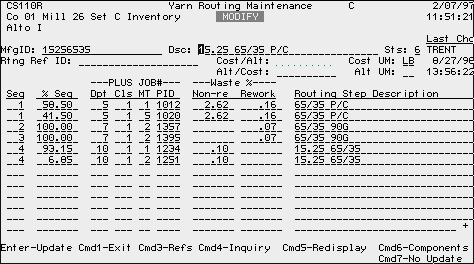
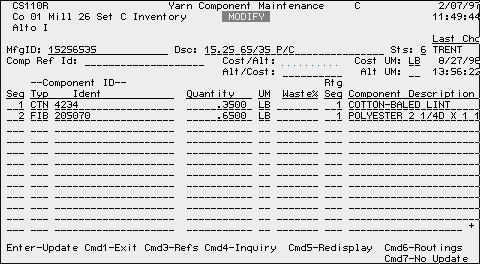
The headings of the two screens shown are the same except for the title. The routing maintenance screen is broken into sections, the sequence section, PLUS job section, the waste section, and the description section. The component section is divided into sections, the component id section, quantity, unit of measure, waste, introduction routing sequence, and the description section.
The following is a description of the items in each of the sections of the routing and component maintenance screens, including the header information.
· MfgID: - The manufacturing id is the name by which the user creates the cost for a product. The id may a descriptive title as is used in the example or it may be a random group of alpha numeric characters. The maximum length of an id is twenty characters. If the MFGID cost is to be transferred to the division product master, the MFGID must be the same in the product master file and the manufacturing cost system.
· Dsc: - The dsc field is the description of the product that is being cost. The description field may be a maximum of thirty characters.
· Sts: - Status is a one digit numeric field that is used by the cost system to determine what is to be done with the manufacturing id. Zero through nine are valid status codes. The manufacturing id has a default status of zero until it is changed by the user. At most locations a status code six will cause the product to be moved to the product master cost system. Status code four, five and six are the only status codes that will generate cost. All other status codes may be used at the discretion of the plant but will not generate cost. LaFrance cost system moves status four, five, and six to the product master cost system.
· Last Chg - Last change is the user who last updated the product id and the date and time that it was updated.
· Rtng Ref ID: - The routing reference id was designed to point a MFGID to an existing MFGID. The routing reference causes the new style to carry the same routings and labor and overhead cost as the style that it references. When the referenced style is maintained or updated the changes are made in all referenced MFGID’s. Also, the routing reference id can be used to copy routings from an existing manufacturing id. The user enters the desired active manufacturing id and presses Cmd5 to redisplay the screen with routing data copied from the active id. After the routings appear, the user can field exit the routing reference field and the new MFGID will become a stand alone style that has to be maintained by the user.
· Comp Ref ID - Same as routing reference id except reference or copy will be of an existing manufacturing id's components
· Alt/Cost: - Conversion factor is used to convert the cost from the cost unit of measure to an alternate unit of measure. An example would be converting the cost of a pound of cloth to cost per yard. Alt/Cost field is stored in the cost system database.
Cost/Alt: - Cost/Alt is the inverse of the Alt/Cost field above. Cost/ Alt is not stored in the database. It is only a screen field.
· Cost UM: - The cost unit of measure is the unit of measure that the standards in the PLUS system are calculated on.
· Alt UM: - The alternate unit of measure is a unit of measure that the user would also like to see the cost stated in.
· Seq - The sequence number is a numeric list of the number of routing steps in the manufacturing process. As seen in the example screen, sequence numbers can be used more than once. This indicates that the product is produced on similar operations or machines that carry a different cost. The difference in cost can be labor, material, or overhead. Examples of differences in cost would be labor rates, waste percentages, and production standards for the machinery.
· % Seq - The percent of sequence is used to apply the percentage of the cost that should be applied to each routing sequence. The routing sequence should total one hundred percent unless there is an exception. If an exception exists the user will be required to press Cmd8 to override the percentage that is less than one hundred percent.
· PLUS JOB# - The PLUS job number is a sequence of numbers from the PLUS system that describes the routing step a product goes through. The sequence includes the department number(Dpt), the job class number(Cls), the operation/machine type(MT), and the production constant or job number(PID). The department number is the department that the routing step is performed in. The job class number is the operator who performs the routing step. The operation or machine type is where the routing step is performed. The production constant is the job number that contains the direct labor cost and machine production information for the cost system.
· Waste % - Waste is broken into two classifications, non-reworkable(Non-re) and reworkable(Rework), that is expressed in the form of a percentage. Non-reworkable waste is waste that the material, the labor, and the overhead value are lost and increase the product cost by the waste percentage. Reworkable waste is waste that the material can be reused but the labor and overhead value is increased by the amount of the waste percentage. The use of the waste percents will be discussed when the cost calculation is discussed.
· Routing Step Description - The default description shown is the description for the PID in the PLUS system. If the users wish they may change the description on the screen.
· Seq - Same as Seq in the routing descriptions.
· Component ID - The component id consists of two parts, the system from which the component is being referenced and the identification number or name in the system. Component types are referenced using a three digit code. Most of the three digit codes are from purchasing systems and are used to separate different types of cost for variance reporting and budgeting. The following is a list of valid component types and what they represent.
FOR - The formula level of the cost system
CSY - The first cost level of the cost system
CSB - The second cost level of the cost system
CSW - The third cost level of the cost system
CPD - The division product master at CPD
PMC - The product master component system
PMP - The division product master cost system
RGS - The division roll goods system
YRN - The division yarn purchasing system
SID - The division supply purchasing system
CSI - The corporate inventory system
CTN - The corporate cotton purchasing system
DYE - The division supply purchasing system for dyes and chemicals
FIB - The corporate man made fiber purchasing system
LEN - The division supply purchasing system for leno weaving yarn
LTX - The division supply purchasing system for latex chemicals
PKG - The division supply purchasing system for packaging materials
SEW - The division supply purchasing system for sewing materials
SIZ - The division supply purchasing system for sizing chemicals
DCP - Special type for die cutting cost
· Quantity - Quantity is the amount of the component that will be found in the finished product. By definition a finished product is the total cost of all routings and components in a cost level.
· UM - UM is the unit of measure that is used to introduce the component from the component system.
· Waste % - The waste percent is the amount of component that is not part of the finished product. An example of this waste is when an operator tries to empty a container of chemicals. There will always be a small amount of the chemical left in the container. The chemical left is considered component waste. Component waste only effects the material cost of the product and the quantity used in the finished product.
· Rtg Seq - This category in the component cost signifies the routing step that the component is introduced into the product.
· Component Description - The component description is the default description from the component id that has been entered from a valid component system.
The screens for all levels in the cost system are the same with the exception of the formula id maintenance. The following is an example of a formula id maintenance screen and a description of each item on the screen. The screen may be seen in menu option two in the cost system interactive menu.
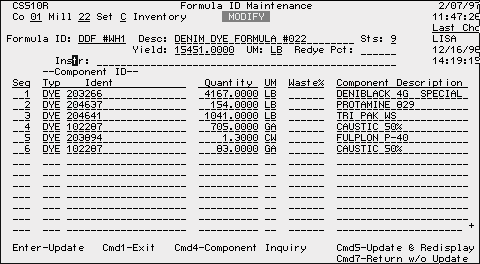
· Formula ID: - Same as MfgID on the routing maintenance screen.
· Desc: - Same as description on the routing maintenance screen.
· Sts - Same as status on the routing maintenance screen.
· Last Chg - Same as last change on the routing maintenance screen.
· Yield - The total amount of formula that is generated from all of its' components. In the example above there were six components that generated 15,451 pounds of formula. The value of each component is extended and summed. The sum is divided by the total yield generated by the formula to calculate a cost per unit.
· UM - Unit of measure that the finished formula will be cost in.
· Redye Pct: - The redye percent is the percentage of the final product that must be reprocessed. This percentage increases the formula cost by the redye percentage.
· Instr: - Instruction or comments about the formula.
· Seq - Same as sequence on the routing maintenance screen.
· Component ID - Same as component id on the component maintenance screen.
· Quantity - The quantity for each component to make up the finished formula.
· UM - UM is the unit of measure that the component is issued in from the purchasing system and how it is introduced into the formula.
· Waste% - Same as waste on the component maintenance screen.
· Component Description - Same as component description on the component maintenance screen.
In some cases it is necessary to have more than one cost for the same product. The ability to have multiple cost can be accomplished by having more than one copy of the cost data or more than one cost set. Copies of the cost data can be made creating new data areas or cost sets. The field for cost set is one place, creating the possibility of having thirty-five sets or data areas.
There are many reasons for having different cost sets. The most common reason for having multiple sets is to give the user the ability to make changes in the cost set without changing the inventory values of the locations products. Some of the most common used cost sets are for inventory valuation, for budgeting, for lifo cost, and for costing products as samples or project cost.
New cost sets are created by the cost system administrator. The cost administrator must be contacted if the need arises for a new cost set. If the need is appropriate, a new cost set will be created by the cost administrator. Each year the locations will be notified what cost sets will be used for budgeting for the next fiscal year and a new cost set will be created. The divisions will be notified which set to use to begin valuing inventory, at the beginning of a new fiscal year.
Cost sets may be deleted when they are no longer needed to cost a divisions products. The sets will be deleted by the cost administrator. when cost sets are deleted, the cost administrator can make a tape backup of the data if the locations feel that the data needs to be retained for some period of time.
System Requirements
PLUS System - The Production Labor Utilization System (PLUS) is used to store the labor and machine data for the cost system. Each cost set is pointed to a PLUS set to retrieve data. The user can determine which PLUS set a particular cost set is retrieving data from by pressing F4 when entering the initial cost system entry screen. Proper maintenance of the PLUS system is one of the most important elements to have accurate product cost.
The product constants for each routing step must exist before the cost system will properly cost a product. Product constants are maintained in the production constants maintenance option of PLUS (option 14, PLUS STANDARDS MENU). Product constants are used to store the direct labor operator cost and the hourly machine production capacity.
Operation/Machine type data is maintained in the Oper/Mach Class Maintenance option in PLUS (option 13 PLUS STANDARDS MENU). Data stored in this option uses consist of the number of machines, the number of units per machine, the authorized job classes, and the assignable units. These data items must be maintained to insure the proper number of machine hours is used to calculate cost.
Job classification data is maintained in the Job Classification Maintenance option in PLUS (option 12 PLUS STANDARDS MENU). The job classification option is used to store the authorized job classifications for each PLUS department. Items stored in job classification maintenance are the job title, rate of pay, the type job (direct, indirect, etc.), the recovery path for indirect jobs, the authorized shifts, the number of budgeted people, and the number of budgeted hours for each shift for indirect labor jobs.
Shift Management - The shift management system stores the valid shifts for each PLUS set. Each shift is defined in shift management with the standard hours per week and the shift calendar for the calendar year. All valid departments are assigned a default shift by the user. Machine types can be assigned to specific shifts and the number of machines and default weekly hours can be overridden in the shift management system.
G/L Account Allocations - General ledger account allocations are stored in the General Ledger Allocation menu option in the manufacturing cost system (option 35 COST INTERACTIVE MENU). Account allocation are calculated by or entered in the budget system G/L account allocation menu options. Account allocations are transferred to the cost system from the budget system during the budgeting process. Account allocations are stored by general ledger account and department. Some general ledger accounts do not require departments. All locations except CPD and LaFrance, allocate accounts at the department and machine type level. CPD and LaFrance allocate accounts at the department level. Each allocation record contains the weekly allocated dollars and to what department or department / machine type the account is allocated.
General ledger accounts are also assigned cost categories. Cost categories are used to group cost. Examples of cost categories are depreciation, supplies, energy, and labor expense (productive direct). Each cost category is assigned to one of six cost summary buckets. The six cost buckets are direct material, indirect material, labor, variable overhead, fixed overhead, and U.C.C.
Cost calculations for the manufacturing cost system are performed in two option on the Cost System Batch Menu. The labor and overhead portion of the product cost is calculated in the process cost generation (option 30 COST SYSTEM BATCH MENU). The addition of waste percentages and the material cost are calculated in manufacturing id cost calculation (option 31 COST SYSTEM BATCH MENU). As cost are generated by the cost system, the cost are stored by cost category at the mfgid level. There are thirty possible cost categories with the possibility of each category being classified as fixed or variable. There are sixty fields in the cost system where the product cost is stored. Each cost category is classified as one of the six cost buckets, direct material (D), indirect material (I), labor (L), variable overhead (V), fixed overhead (F), and U.C.C. (U). The following are examples of different cost calculations in the manufacturing cost system.
Direct Labor - Direct labor for the cost system is stored in the PLUS system production constant maintenance option. The following is an example of a production constant screen.
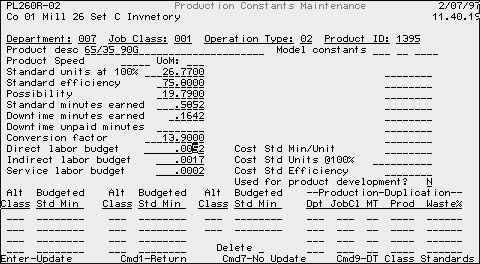
Direct labor standards are stated as production unit cost and must sometimes be converted to cost units using the conversion factor in each production constant record. If the conversion factor field is not populated the cost system will generate a zero cost at that routing step because the cost will be multiplied by a conversion factor of zero. Direct labor cost is calculated as follows:
Standard minutes earned X (Hourly base rate ¸ 60) ¸ Conversion factor = Direct Labor Budget
Example: .5852 X ( $7.39 ¸ 60 ) ¸ 13.90 = $.0052
A training allowance is also added to any labor cost that is calculated. The training percentage is stored in the department maintenance menu option of PLUS ( option 11 PLUS STANDARDS MENU). For the department in this example the training allowance is three percent. The cost would be increased by multiplying the labor cost times one plus the training percent ( $.0052 X ( 1 + .03)).
At the bottom of the Production Constants Maintenance screen you will find fields labeled Alt Class and Budgeted Std Min. These two fields are used for jobs that are classed as alternate direct jobs. Alternate direct jobs minute rates are already in the cost unit of measure, so it is not necessary to use the conversion factor. After the alternate direct base cost is calculated a training allowance is added as was done on the direct labor job class. The cost for an alternate direct job is calculated as follows:
Budgeted Std Min X (Hourly base rate ¸ 60) = Alt Direct Labor Budget
Alt Direct Labor Budget X (1 + Training Percent) = Total Alt Direct Labor Cost
Indirect Labor - Indirect labor cost is calculated as the weekly dollars budgeted at the department / machine type level divided by the expected machine product for that machine type. Following is an example of that calculation.
From the Production Constant used in the direct labor example and the shift management system calculate the expected weekly production.
Expected Production Calculation:
Standard units at 100% X Standard Efficiency X Conversion Factor = Hourly Prod.
Std Unit @ 100 X (75.80 ¸ 100) Std Eff X 13.90 Conv Factor = 282.05 Lbs/Hr
Hourly Production X Weekly Department Hours = Total Weekly Expected Prod.
282.05Lbs X 160 Hrs/Wk = 45,128.65 Lbs. Per Week
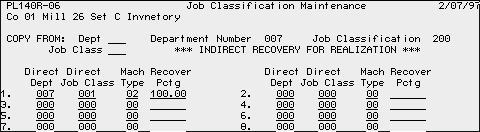
Weekly Expense Calculation: Use Job Class 200 Dept. 7 for example.
The screen above shows the indirect recovery path that was use for job class 200 in department 7. The indirect cost is to be calculated from production from department 7, job class 1, and machine type 2.
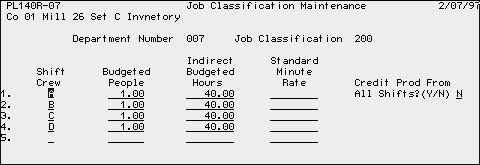
Total Weekly Indirect Budgeted Hours X Hourly Pay X Training Allow. = Wkly Cost
160 Hrs. X $9.97/Hr. X (1 + .03) Training = $1643.06 / Week
(40 hours/shift X 4 shifts)
Total Weekly Cost ¸ Total Weekly Expected Production = Indirect Cost per Unit
$ 1,643.06 / Wk ¸ 45,128.65 Lbs/Week = $ .0364 / Lb.
The previous example shows how one indirect labor job is calculated. The cost system accumulates the indirect labor for all indirect jobs by recovery path. For each department / job class / machine type, the indirect labor training allowance is added and the cost is totaled. The total weekly production is calculated for all production constants in PLUS. The total indirect labor cost is divided by the total weekly production for all department / job class / machine type that match the recovery path and the production constants. The cost per unit is stored by routing sequence in the proper cost category for labor. This step is repeated for each production constant in the PLUS set files.
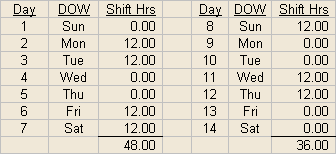
Overtime - Overtime is defined as the average weekly hours over forty hours per week for each job class. Overtime is calculated using the shift cycle in shift management. For example, if a shift is schedule for three days one week and four days the next week twelve hours per day, the employee would work thirty-six hours one week and forty-eight hours during the next week. During the two week cycle, the employee will work eight total overtime hours. The average overtime per week is four hours. The average hours are divided by two and multiplied by the hourly pay rate for total overtime dollars per week. Using total weekly production as used in indirect labor, total overtime dollars are divided by the total weekly production for the production constant in PLUS. The calculation is shown in the following example.
An employee is assigned a shift that has a cycle that repeats in two weeks.
During the two week cycle, the employee worked eight hours which exceeded forty.
8.0 Hrs. ¸ 2 Wks. = 4.0 Avg. Overtime Hrs./Wk.
4.0 Avg Overtime Hrs./Wk. X .5 = 2.0 Payable Half Time Hrs.
2.0 Half Time Hrs. X $ 9.97 / Hr. = $ 19.94 / Wk. Overtime
$ 19.94 / Wk. Overtime ¸ 45,128.65 Lbs/Week = $ .00044 / Lb. Overtime Cost
Using the same logic any shift arrangements overtime cost can be calculated.
Material - Material cost is introduced using two methods. Material cost is entered as a material component in any of the four cost levels. The formula level may be used to introduce material cost.
Entering material as a component in a cost level, the material should be entered using valid raw material type, a valid id from the raw material system, the quantity entered is the amount to make one finished unit at that cost level, the unit of measure, any material waste incurred, and the routing sequence the material is introduced into the product. If the routing sequence is not entered it will default to sequence one. The cost for material is calculated as follows:
Cost / Consumption unit X Quantity used ¸ (1 - Component waste) ¸ (1 - Routing Waste) = Cost / Cost Unit of Measure
In the mfgid used in the earlier examples assume the cost of CTN 4234 is $ .70 per pound.
$ .70/ Lb X .35 Lbs ¸ (1- 0 component waste) ¸ (1 - .0272) = $.2519 / Lb of Cotton
Entering material as a component in a formula, the same information is entered as in the component material except a routing sequence is not necessary. The following is an example of the costing of one element in the formula maintenance screen seen earlier.
Cost / UOM X Quantity used ¸ (1- Waste %) = Cost for a Component
All component values are extended and accumulated. The accumulated value is divided by the yield for the cost per unit of each formula.
The following is an example of a simple formula. To keep the example simple, the cost of the three components will $1.00 each.
$ 1.00/ Lb X 1.70 Lbs ¸ (1- 0 component waste) = $1.70 / Lb
$ 1.00/ Ea X 1.00 Ea ¸ (1- 0 component waste) = $1.00 / Ea
$ 1.00/ Ea X .0006 Ea ¸ (1- 0 component waste) = $ .0006 / Ea
$1.70 + $ 1.00 + $ .0006 = $ 2.7006 Total Formula Cost
$ 2.7006 ¸ 1.50 Yield = $ 1.8004 / Lb
The cost of $ 1.8004/ Lb is the value that will be used as the component cost in a mfgid.
Waste Calculation - Waste applied to a product in the cost system is a cumulative waste percent at each routing sequence. A cumulative waste percentage is calculated starting at the final routing step and accumulating the waste for each process that the product or mfgid is routed through. Using the yarn mfgid from the earlier examples, the waste for material, labor and overhead is calculated as follows.
In the example, waste will be calculated for the material separately from the waste for labor and overhead. Two calculations are necessary because reworkable waste does not apply to material in a mfgid. In reworkable waste no accountable amount of the material is lost, only the labor and overhead is lost in manufacturing the product.
Material waste example:
1 finished unit ¸ (1- waste in last routing) = waste multiplier at this routing
1.0 Lb ¸ (1 - .1%(.0010)) = 1.001001 waste multiplier
This waste multiplier is used for any material introduced at this routing sequence or any other earlier sequence until another waste factor is added to the cost. In the example, 1.001 would be used as the material waste multiplier for routing sequences two through four. An additional waste factor is added in routing sequence one.
Waste multiplier from prior step ¸ ( 1 - waste in next routing) = new waste multiplier

1.001001 ¸ ( 1 - 2.62%) = 1.02793 waste multiplier
Calculating the waste percentage from the waste multiplier is done by taking the inverse of the multiplier and subtracting it from one (1).
1 ¸ 1.02793 = .97283 1 - .97283 = 2.717 % non-reworkable waste
The waste multiplier calculation is repeated as many times as necessary for each waste factor that is on a mfgid.
The waste calculation for labor and overhead uses the same method as the waste for material, except the total waste for each routing sequence is used. The labor and overhead waste for the yarn example is as follows.
1 ¸ ( 1- .10%) = 1.00101 Routing Sequence 4
1.00170 ¸ ( 1- .07%) = 1.00170 Routing Sequence 3
1.00170 ¸ ( 1- .07%) = 1.00240 Routing Sequence 2
1.00240 ¸ (1 - .16%) = 1.004001 Routing Sequence 1
1.004001 ¸ (1 - 2.62%) = 1.031021 Routing Sequence 1
Waste Percentage
1 ¸ 1.031021 = .96991 1 - .96991 = 3.00 % waste
Alternate Cost Methods - Two locations do not use the original cost system calculation. Due to the nature of the business at the CPD and LaFrance locations, they cost goods applying a percentage of labor to calculate the indirect labor at CPD and the overhead cost at both locations. CPD uses only the direct labor because it is such a large part of the cost at each plant but LaFrance uses the total labor budget for each production department.
A file with a weekly labor amount at the department level is used to create a factor to apply to the labor cost in each routing sequence of a mfgid. The labor file contains the amount of labor required to produce the required production in each department. At CPD the labor file contains only the hourly direct operator labor required to produce a product. At LaFrance the labor file contains all hourly labor required to produce a finished product. The weekly department budget for each overhead account is divided by the labor amount for that department to create a factor which is used as a multiplier in each routing cost. Following will be a simple example of the alternate cost method.
Cost Data Required:
Department 315 Labor: $12200 / Week
Labor Routing Cost per Unit: $ .4803 / Unit
Indirect Labor Job 309 Cost: $ 244.00 / Week
Depreciation Cost Allocation Dept. 315: $660.00 / Week
Labor or Overhead Cost / Week ¸ Department Week Labor Cost = Cost Factor
Labor Factor:
$244.00 / Wk ¸ $12,200 / Wk = .02 Labor factor for this Indirect Job
Overhead Factor for Depreciation
$660.00 / Wk ¸ $12,200 / Wk = .0541 Depreciation factor for Dept. 315
Each time a cost routing uses department 315 in this example, the direct labor cost is multiplied by these factors to calculate the cost for each indirect labor job at CPD and each G/L account at CPD and LaFrance. The calculation is done as follows:
$ . 4803 Labor / Unit X .02 Indirect labor factor = $ .0096 /unit indirect cost
$ . 4803 Labor / Unit X .0541 depreciation factor = $ .0260 /unit depreciation cost
The factor calculation must be repeated for each department for all indirect labor jobs and G/L account allocations budgeted to that department. Remember the cost at LaFrance is only calculated for overhead using this method. Indirect labor is calculated using the original indirect labor cost calculations.
The previous sections have described the major cost calculations in the cost system. There may be some location specific items that was not described. These items will be handled on an individual location basis.
The cost system has two menus, an interactive menu and a batch menu. The interactive menu options contains the manufacturing id maintenance, cost inquiries and other inquiry options. Options on the batch menu include the cost calculations, various cost lists, and detailed cost sheets for each cost level. Following will be a description of each menu option.
- Formula Mfg Specification Main - LaFrance specific option that is not used at any other location.
- Formula MfgID Maintenance - Menu option used to create and maintain formulas used in other levels of cost to introduce direct or indirect material to a mfgid.
- Option not used.
- Cost Level One MfgID Maintenance - Lowest level of cost where mfgids are created and maintained. Items stored in this menu option include mfgid, mfgid description, routing sequences, waste percentages, and materials or components. Mfgids created in this level may be used as a component in all other cost levels. The menu option title will vary from location to location.
- Beaming Mfg Specification Main - LaFrance specific option that is not used at any other location.
- Cost Level Two MfgID Maintenance - Same as menu option four. Mfgids created in this level may be used as a component for cost levels three and four but not for level one.
- Weaving Mfg Specification Main - LaFrance specific option that is not used at any other location.
- Cost Level Three MfgID Maintenance - Same as menu option four. Mfgids created in this level may be used as a component for cost level four but not for levels one or two.
- Weaving Set Up/Pattern Maint - LaFrance specific option that is not used at any other location.
- Finish MfgID Maintenance - Same as menu option four. Mfgids created in this level may not be used as a component for any other cost level. All other mfgid from the first three cost levels may be used a component for cost level four.
- Finishing Gain or Loss - Menu option is used to store changes in finishing gain or loss for the budget system. If a change in return on finishing or finishing gain or loss is anticipated, the change can be entered in this option for use in the budget system and not be recognized in the standard cost of a mfgid.
- Standard Gain/Loss Maintenance - LaFrance specific option that is not used at any other location.
- Product ID Menu - LaFrance specific option that is not used at any other location.
- Consumption Engine - The consumption engine is used to break down a mfgid into its components. Doing the break down the user can determine the amount of material that is required to produce a specific quantity of a mfgid. The budget system and the variance system use the consumption engine. The consumption engine program is used by these systems to calculate material usage for budget ids and manifested production for the variance system.
- Raw Material Inquiry - Raw material inquiry allows the user to inquire concerning the standard cost of a material to be used by the cost system. The inquiry is done selecting the raw material system, the Mount Vernon part number, and the desired unit of measure. The inquiry will return the cost per unit that is used by the cost system.
- Consumption Engine by Dept/MT - Same as option fourteen using a different sort.
- Option not used.
- Option not used.
- Find Component Usage - Using the component type and the component id, this option will display all the mfgids that use the requested component.
- Formula ID Cost Inquiry - Formula cost inquiry will display the cost for the formula id requested. The cost type for the id must be entered for the cost to be displayed. Cost types will be discussed in Batch Menu option thirty.
- Option not used.
- Cost Level One MfgID Cost Inquiry - Same as menu option twenty.
- Option not used.
- Cost Level Two MfgID Cost Inquiry - Same as menu option twenty.
- Option not used.
- Cost Level Three MfgID Cost Inquiry - Same as menu option twenty.
- Option not used.
- Cost Level Four MfgID Cost Inquiry - Same as menu option twenty.
- Find Routing Usage - Routing usage option generates the use of the routings in the cost system for a given amount of product or mfgid. The routing usage uses the same concept as the consumption engine to generate labor usage for a mfgid. The budget and variance system also use the routing engine to generate labor usage for these two systems reports.
- Calc Execution Status Inquiry - This option allows the user to determine what parameters were used to calculate the process cost calculation, the mfgid cost calculation, and the product master update. The status tells the user who calculated the cost, what date and time they calculated, and what fiscal year for overhead was used to calculate cost. The status is requested by cost type.
- Predetermined Cost Maintenance - Menu option allows the user to change the cost that is used to calculate mfgid cost. The user can create cost types beginning with the letter P and ending with any alpha-numeric character (i.e. PA), except the letter B. Cost type PB is reserved for use with the budget system. The user can enter a new cost or a percentage increase for any component used in the cost system. The system will replace the standard cost with new cost entered by the user and recalculate the mfgid cost. An incremental percentage increase can also be entered for labor and overhead. When using the option in conjunction with the budget system, each component’s cost can be changed for each budget period in the budget set.
- Level Description Maintenance - The level descriptions for each location can be changed in this option to match the actual product that is be cost in each level. These descriptions will be used in mfgid maintenance programs and reports.
- Option not used.
- Option not used.
- General Ledger Allocation - Option is used to store the general ledger allocation for each G/L account that is budgeted by each location. Update of the data in this option is usually systematically loaded from the budget system during the budget process.
- G/L Allocation Discrep List - Option produces a list of discrepancies which may exist that can cause incorrect cost to be generated.
- Option not used.
- Formula ID Listing - The option generates a report that gives a list of the components and all items necessary to create a formula. The list is a printed copy of the mfgid maintenance screen in option 2 of the interactive menu. The list is in formula id sequence.
- Option not used.
- Cost Level One MfgID Listing - The option generates either a component or routing list for each mfgid in the cost level. The list is a printed copy of the mfgid maintenance screen in options 4, 6, 8, or 10 of the interactive menu.
- Option not used.
- Cost Level Two MfgID Listing - The option generates either a component or routing list for each mfgid in the cost level. The list is a printed copy of the mfgid maintenance screen in options 4, 6, 8, or 10 of the interactive menu.
- Weaving Specification Print - LaFrance specific option that is not used at any other location.
- Cost Level Three MfgID Listing - The option generates either a component or routing list for each mfgid in the cost level. The list is a printed copy of the mfgid maintenance screen in options 4, 6, 8, or 10 of the interactive menu.
- Option not used.
- Cost Level Four MfgID Listing - The option generates either a component or routing list for each mfgid in the cost level. The list is a printed copy of the mfgid maintenance screen in options 4, 6, 8, or 10 of the interactive menu.
- Option not used.
- Option not used.
- Option not used.
- Cost Level One Detailed Cost Sheet - This option generates a detailed print of the all the cost required to produce a mfgid. The report has two parts. The front sheet is the detail of the material cost and the total cost summary. Sheet two has the labor and overhead detail for the mfgid.
- Cost Level Two Detailed Cost Sheet - This option generates a detailed print of the all the cost required to produce a mfgid. The report has two parts. The front sheet is the detail of the material cost and the total cost summary. Sheet two has the labor and overhead detail for the mfgid.
- Cost Level Three Detailed Cost Sheet - This option generates a detailed print of the all the cost required to produce a mfgid. The report has two parts. The front sheet is the detail of the material cost and the total cost summary. Sheet two has the labor and overhead detail for the mfgid.
- Cost Level Four Detailed Cost Sheet - This option generates a detailed print of the all the cost required to produce a mfgid. The report has two parts. The front sheet is the detail of the material cost and the total cost summary. Sheet two has the labor and overhead detail for the mfgid.
- Copy Mfgid Set To Set - This option allows the user to copy mfgids that were created in a different cost set to be copied to as many other cost sets as needed. The copy function has two methods to copy ids, add only or add and replace. Generally the add only method is used. If the user wishes to copy ids from more than one level of cost, the copy must be repeated for each cost level.
- Component Listing - The component list generates a report showing in detail or summary each component that is used in all levels of the cost system. The user may choose to print all material types or just one material type.
- Update Supply Inventory Costs - This option moves the last matched price for each supply inventory item to the standard cost field in the supply system. This supply inventory cost is used in calculating standard cost in the cost system. Supply cost should be updated quarterly by each location, unless notified not to do so by the cost system administrator or the corporate controller.
- Component Scan and Replace - Scan and replace allows the user to find a particular component type and component id and replace it with a new component type and component id. The program locates each time a component is used in all cost levels and replaces it with the new component. The user must be sure that the component needs to be replaced in each use in the cost set before running a scan and replace option.
- Cost Level One MfgID Cost Listing - Cost listings generate a report as a summary or in detail. The summary level is a list of the selected mfgid cost. The detail report is by mfgid and prints the detail cost by cost category.
- Routing Scan and Replace - This option performs the same task as the component scan and replace for routings in the different cost levels.
- Cost Level Two MfgID Cost Listing - Cost listings generate a report as a summary or in detail. The summary level is a list of the selected mfgid cost. The detail report is by mfgid and prints the detail cost by cost category.
- Option not used.
- Cost Level Three MfgID Cost Listing - Cost listings generate a report as a summary or in detail. The summary level is a list of the selected mfgid cost. The detail report is by mfgid and prints the detail cost by cost category.
- Option not used.
- Cost Level Four MfgID Cost Listing - Cost listings generate a report as a summary or in detail. The summary level is a list of the selected mfgid cost. The detail report is by mfgid and prints the detail cost by cost category.
- Option not used.
- Process Cost Generation - Process cost generation runs the cost calculation to cost the labor and overhead portion of the cost. The cost is generated using selections for the fiscal year and cost type. Fiscal year is used to select the weekly overhead amount to be used by the cost system. The cost type determines what to label each cost that is calculated. Cost type is a two position field that must be either ‘SD’, ‘NC’, or ‘P’ plus another alpha-numeric character. Cost type ‘SD’ generates a standard or inventory value cost. Cost type ‘NC’ generates a non-cumulative cost for the cost at each cost level. The ‘NC’ cost does not bring forward any components that were generated in another cost level. The ‘P’ type or predetermined cost type creates a cost used in sample costing and for customer quotes. The predetermined cost allows the user to override certain cost in option 31, Pre-Determined Cost Maint on the interactive menu. The process cost option can be run as a full or partial cost calculation. In most cases, the calculation should be run as a full recalculation.
Four reports can be generated in the process cost generation. These reports are the G/L allocation report by machine type, the G/L allocation report by account, the indirect and service labor cost calculation, and the process cost per unit calculation.
- MfgID Cost Calculation - Mfgid cost calculation uses the routing sequence cost that were calculated in the process cost generation and adds the component cost and the additional cost created by the waste which is in the mfgid routings and components. The option is run by cost type, overhead year, and whether to print the cost detail. The user should generally run this option and not print the detail of cost. After the cost has calculated for each cost level, a report is generated detailing any mfgids that did not cost properly. The user should correct any errors and rerun both cost calculation options.
- Update Product Master Costs - This option moves the latest product cost from the cost system to the locations product master. Each location has defined which cost should be moved by status codes on each mfgid and which cost levels should update the product master. Reports are generated giving the mfgids that were updated in the product master.
- Flag Inactive MfgIds - Flag mfgids is used to inform the user of any ids that have been inactive from a specified date to the present. The option will allow the user to generate a report only or change the status of the mfgid to a status code selected by the user.
- Clear Future Prod. Master Cost - Clearing future cost can be run to clear the future cost in the product master if the cost was updated in error.
- Purge GL Acct Allocation Files - This option gives the user the ability to purge the G/L account allocations for selected years. As cost sets are copied year after year, it is a good practice to purge the allocation that are over three years old in the active cost sets.
- Delete MfgIds by Status - This option allows the user to delete mfgids by a specified mfgid status. After mfgids have been flagged in option 33, they can be deleted by running option 36.
The presentation of the manufacturing cost system manual has been general in nature. Specific question about individual location cost procedures and cost methods should be directed to the cost system administrator.